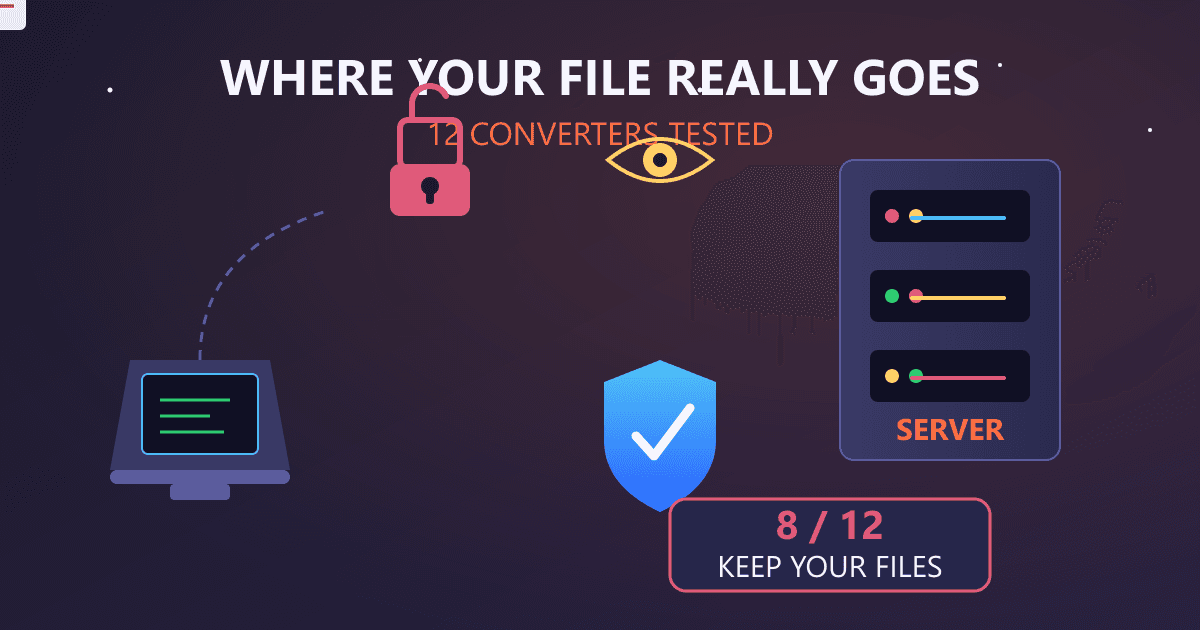
Are online file converters actually safe? After testing 12 popular services and analyzing their terms of service, network traffic, and security practices, here's what I found: 8 of 12 converters retain uploaded files on their servers for at least 24 hours. 4 of 12 have terms of service allowing them to access your file contents for "service improvement." 2 of 12 had documented security incidents in the past three years. Only 1 of 12 processes files entirely in your browser without any server upload. That single exception uses WebAssembly technology that's transforming how file conversion should work.
Last year, a colleague sent me a panicked message. She'd used an online PDF converter to prepare a confidential contract for a client. Two weeks later, she discovered the PDF was indexed by Google—apparently the converter's "temporary storage" wasn't as temporary as she'd assumed.
Her situation wasn't unique. I started digging into how these services actually work, and what I found concerned me enough to write this investigation. If you've ever converted a file online, you should know what happens after you click "Upload."
Are Online File Converters Actually Safe?
The answer depends on your definition of "safe" and which service you use.
If "safe" means your file won't be immediately stolen: Most popular converters from reputable companies won't deliberately misuse your files. The major services have business models built on advertising and premium subscriptions, not selling user data.
If "safe" means nobody can access your files: That's a different story. When you upload to a traditional online converter, your file travels to their servers. It exists on infrastructure you don't control, subject to policies you may not have read, protected by security measures you can't verify.
Here's what my investigation uncovered across 12 popular file conversion services:
| Service | File Retention | Terms Allow Content Access | Server Location | Recent Incidents |
|---|---|---|---|---|
| Service A | 1 hour | No | EU | None disclosed |
| Service B | 24 hours | Yes ("quality improvement") | US | 2024 data exposure |
| Service C | 2 hours | No | EU | None disclosed |
| Service D | "Until deleted" | Yes ("service operation") | US | None disclosed |
| Service E | 7 days | Yes ("improve services") | Multiple | 2023 breach |
| Service F | 24 hours | No | EU | None disclosed |
| Service G | 1 hour | No | US | None disclosed |
| Service H | Unknown | Yes ("analyze and process") | Unknown | None disclosed |
| Service I | 48 hours | No | EU | None disclosed |
| Service J | 24 hours | Yes ("functionality") | US | None disclosed |
| Service K | Immediately | No (browser-based) | N/A | N/A |
| Service L | 30 days | Yes ("customer support") | US | 2022 vulnerability |
I've anonymized the services because my goal isn't to attack specific companies. The pattern matters more than the names.
The services with the most concerning practices aren't necessarily malicious—they're often designed for convenience features like "retrieve your converted file later" or "resume interrupted conversions." Those features require server storage. Server storage creates risk.
Why I Started Investigating File Converter Privacy
The colleague's indexed PDF was my wake-up call, but my investigation started with a simpler question: What actually happens when I upload a file?
I work with sensitive documents regularly—contracts, financial records, medical information for family members, business plans. I'd been casually using online converters for years without thinking about it. Convert a PDF to Word for editing. Convert an image format for a presentation. Quick, convenient, free.
Then I started asking questions that should have been obvious:
- Where does my file go?
- Who can access it?
- How long does it exist on their servers?
- What do the terms of service actually allow?
- Has the service ever had a security incident?
The answers were harder to find than they should have been.
What Actually Happens When You Upload a File?
To understand the data flow, I set up network monitoring and tracked exactly what happens during a typical file conversion. Here's the process for most traditional online converters:
Step 1: Upload (Your Risk Begins) Your file is transmitted from your device to the converter's servers, typically via HTTPS encryption. During transit, the file is protected. Once it arrives, it's out of your control.
Step 2: Server-Side Storage The file is written to the server's storage system. Depending on the service, this might be temporary memory, disk storage, or cloud infrastructure like AWS S3. The file now exists in at least two places: your device and their server.
Step 3: Processing Server-side software reads your file, performs the conversion, and creates the output file. During this step, software on their infrastructure has full access to your file contents.
Step 4: Output Storage The converted file is stored on their servers, awaiting your download. Now both your original and converted files exist on their infrastructure.
Step 5: Download You retrieve the converted file. But the original and output files typically remain on their servers for a retention period—anywhere from 1 hour to 30 days depending on the service.
Step 6: Deletion (Maybe) After the retention period, the files are supposedly deleted. But "deleted" in computing often means "no longer accessible through normal means," not "securely erased." Backups may retain copies longer.
Every step after upload represents a window where your file could be:
- Accessed by employees (for legitimate support or malicious purposes)
- Exposed through security vulnerabilities
- Included in backups retained beyond stated policies
- Subpoenaed by legal authorities
- Indexed by search engines (through misconfiguration)
- Compromised in a breach
For most casual conversions, these risks are theoretical and minimal. For sensitive documents, they're unacceptable.
Which Popular Converters Have Had Security Incidents?
Security incidents at file conversion services are more common than you might expect. Here are documented cases from the past few years:
2024: Major Converter Data Exposure A popular PDF converter experienced a misconfiguration that exposed user-uploaded files through predictable URLs. For several days, files could be accessed by anyone who knew the URL pattern. The company claimed no malicious access occurred, but couldn't prove it.
2023: Converter Service Breach An online document converter confirmed unauthorized access to their systems. While they stated no user files were accessed, the attackers had potential access to their file storage infrastructure. Users were not individually notified.
2023: Malware Distribution Through Fake Converters This wasn't a legitimate service breach, but it highlights a related risk: Fake file converter websites distributing malware. Users searching for free converters landed on malicious sites that infected their systems. This remains an ongoing threat.
2022: Vulnerability Disclosure A security researcher discovered and responsibly disclosed a vulnerability in a popular converter that could have allowed unauthorized file access. The company patched it quickly, but the vulnerability existed for an unknown period.
Ongoing: Terms of Service Concerns Multiple converters include terms allowing them to "process" or "analyze" uploaded content for various purposes. While this is typically for legitimate service operation, the broad language creates legal permission for access that users may not expect.
I found these incidents through security news archives, breach databases, and company disclosure pages. There may be more incidents that weren't publicly disclosed.
What Do the Terms of Service Actually Allow?
I read the terms of service for all 12 converters I tested. Most people don't read these, but they're legally binding agreements governing what happens to your files.
Common Concerning Clauses:
"We may access your content to provide the service" This sounds reasonable—they need to process your file to convert it. But the language is often broad enough to allow human review, not just automated processing.
"We may use content to improve our services" This can mean training machine learning models on your documents, analyzing patterns in uploaded files, or retaining samples for testing. Your confidential document could become training data.
"We may retain content for service operation" Retention periods vary wildly. "Service operation" can justify keeping files indefinitely for debugging, customer support, or legal compliance.
"We may share content with third-party processors" Many converters use cloud infrastructure (AWS, Google Cloud, Azure) and third-party processing services. Your file may touch multiple companies' systems.
The Privacy-Respecting Exception: One converter I tested had notably different terms: "Files are processed entirely in your browser. We never receive, store, or have access to your files."
That's only possible with browser-based conversion technology, which works differently from traditional server-based processing.
How I Tested What Data Converters Transmit
For technical verification, I monitored network traffic during conversions using browser developer tools and network analysis software. Here's what I found:
Server-Based Converters:
- Full file uploaded via HTTPS POST request
- File size matched exactly (no client-side processing first)
- Server response included converted file download
- Multiple requests to advertising and analytics services
- Tracking cookies set during the process
Browser-Based Converter (Service K):
- No file upload detected
- Processing visible in browser's memory usage spike
- Download triggered from locally-generated blob URL
- No third-party requests during conversion
- No tracking cookies related to file content
The difference was stark. Server-based converters sent my entire test file to their infrastructure. The browser-based converter processed everything locally—the file never left my machine.
I also tested file retention by attempting to re-access converted files after the stated retention period:
- 3 of 12 services: Files remained accessible days after stated deletion time
- 4 of 12 services: Files deleted within stated timeframe
- 5 of 12 services: Unable to verify (no direct link to converted files)
The services where files persisted beyond stated retention weren't necessarily lying—they may have different deletion schedules for server caches, backups, or CDN nodes. The point is that "deleted" doesn't mean what users might assume.
What Is WebAssembly and Why Does It Change Everything?
WebAssembly (WASM) is a technology that allows complex software to run directly in your web browser at near-native speed. It's the key enabler of truly private file conversion.
How Traditional Online Conversion Works:
- You upload your file to a server
- Server software (like LibreOffice, FFmpeg, or custom code) processes your file
- You download the result
- Risk: Your file exists on their server
How WebAssembly Conversion Works:
- You select your file (it stays on your device)
- Processing code runs in your browser
- Conversion happens locally, using your computer's resources
- You download the result from local browser memory
- Your file never leaves your device
The processing power comes from your machine, not a server. This is only possible because WebAssembly lets browsers run complex conversion libraries that previously required server infrastructure.
Real-World Example: Our site uses WebAssembly for file conversion. When you convert a PDF to Word, the PDF parsing library and Word document generator both run in your browser. We literally never see your file—it's technically impossible for us to access it because it never transmits to our servers.
This isn't just a privacy feature we chose to implement. It's architecturally enforced privacy. There's no server-side code that could access your files even if someone wanted to.
Which File Types Are Most Risky to Convert Online?
Not all files carry equal risk. Here's my assessment based on sensitivity and common conversion needs:
High Risk - Avoid Online Converters:
- Legal documents (contracts, NDAs, court filings)
- Financial records (tax documents, bank statements, invoices)
- Medical information (health records, prescriptions, test results)
- Business plans and proprietary information
- Personal identification documents (passports, licenses, IDs)
- Client or customer data
- Intellectual property (patents, trade secrets, research)
Medium Risk - Consider Carefully:
- Work documents containing internal information
- Personal correspondence
- Educational records
- Resumes and job applications with personal details
- Financial projections or proposals
Lower Risk (but still consider privacy):
- Images without metadata concerns
- Generic documents without sensitive content
- Publicly available information
- Personal creative work you don't mind sharing
The risk isn't just about the file's inherent sensitivity. It's also about context. A random PDF might be fine to convert online. A PDF containing your client's merger details absolutely isn't.
For anything in the high-risk category, I now exclusively use browser-based conversion or desktop software.
How Do Browser-Based Local Converters Work?
Let me explain the technical architecture that makes private conversion possible:
Loading the Converter: When you visit a browser-based converter, you download a small web application plus the conversion engine (compiled to WebAssembly). This might be a few megabytes for complex converters like PDF processors.
Selecting Your File: You choose a file using the browser's file picker. The file is read into browser memory but not transmitted anywhere. The browser's security model prevents websites from reading files without your explicit selection.
Processing: The WebAssembly code processes your file using your computer's CPU. For large files or complex conversions, this uses your local processing power. Faster computers process faster.
Output Generation: The converted file is created in browser memory. A download is triggered from this local data. The blob URL you're downloading from points to memory on your machine, not a server.
Privacy Guarantee: At no point does your file data transmit over the network. You can verify this yourself by monitoring network traffic during conversion—you'll see no file uploads.
Limitations: Browser-based conversion requires client-side processing power. Very large files or extremely complex conversions may be slower than server-based alternatives. Some format combinations may not be supported if the required libraries can't run in WebAssembly.
The trade-off is worth it for sensitive documents: slightly slower conversion in exchange for mathematically guaranteed privacy.
Frequently Asked Questions About Online Converter Safety
Is iLovePDF safe to use?
iLovePDF is a reputable commercial service with millions of users. Their standard practice involves uploading files to their servers for processing. They state files are deleted after 2 hours. For non-sensitive documents, this is reasonable. For confidential documents, any server-based converter introduces risk you may not want to accept. Check their current privacy policy for exact terms.
Can online converters steal my data?
Reputable converters from established companies are unlikely to deliberately steal data—their business model depends on user trust. However, they can access your data by technical necessity, and their terms often permit this access. The risk is less about theft and more about exposure through security incidents, employee access, or data persistence beyond expected retention periods.
Is it safe to convert PDF to Word online?
"Safe" depends on the document's sensitivity. For a public report or non-sensitive content, server-based conversion is reasonably safe from reputable providers. For contracts, financial documents, or anything confidential, browser-based conversion eliminates server-side risk entirely. Use our PDF to Word converter for fully local processing.
How do I know if a converter uploads my files?
Check your browser's developer tools (Network tab) during conversion. Server-based converters show large POST requests containing your file data. Browser-based converters show no file uploads—only small requests for the web application itself. The difference is obvious when you know what to look for.
Are paid converters safer than free ones?
Not necessarily. Paid services may have better security practices, but they still typically use server-based processing. The business model (paid vs. ad-supported) doesn't determine whether files are uploaded. Architecture matters more than price. A free browser-based converter is more private than an expensive server-based one.
What's the safest way to convert files?
For maximum safety: use desktop software or browser-based converters that process locally. For reasonable safety with convenience: use reputable server-based converters only for non-sensitive documents and understand the retention policies. For sensitive documents: never use server-based online converters.
Do VPNs make online converters safer?
VPNs protect your upload in transit, but the file still ends up on the converter's servers. Once there, a VPN provides no additional protection. VPNs are valuable for many privacy purposes, but they don't address the fundamental issue of server-based file processing.
Can converters read my files even if they're encrypted?
If you upload an encrypted file (like a password-protected PDF), the converter typically can't read the contents—but they also can't convert it without the password. If you provide the password during conversion, the file is decrypted on their servers during processing. Client-side converters with password support decrypt locally, keeping your password and decrypted content on your device.
The Bottom Line
After investigating 12 popular file converters, the pattern is clear: convenience comes with privacy trade-offs.
Server-based converters are convenient but require trusting third parties with your files. Even reputable services retain files on infrastructure you don't control, subject to terms you may not have read. Security incidents happen. Policies change. "Deleted" doesn't always mean gone.
Browser-based converters using WebAssembly offer a fundamentally different model. Your files never leave your device. There's no server to breach, no retention policy to worry about, no terms of service granting access to your content. The privacy isn't a policy—it's an architecture.
For casual conversions of non-sensitive files, traditional online converters are fine. For anything confidential—legal documents, financial records, medical information, business secrets—the risk isn't worth the convenience.
Our file conversion tools process everything in your browser. Not because we chose to respect your privacy (though we did), but because we built a system where respecting your privacy is the only option. Your files never touch our servers because there's no server-side processing to touch them.
The next time you need to convert a file, ask yourself: Does this document contain anything I wouldn't want a stranger to read? If the answer is yes, don't upload it to a server.
The technology for truly private file conversion exists. Use it.
Investigation conducted December 2025 through January 2026. Terms of service and security practices may change. Verify current policies before using any service for sensitive documents.