Every portfolio tracker will show you a pie chart. Fewer will tell you what to do about it. That gap is the whole problem with drift: you can see that equities have swollen past your target, but turning "58.8% versus a 55% target" into an actual trade list — sell this much of that, buy this much of this, in which order — is where free tools usually stop and paywalls begin.
The free portfolio rebalancing planner closes that gap in the browser. Import a holdings CSV, set target weights, and it computes the drift per asset plus the exact buy and sell amounts to reach target — with buy-preferred ordering (sell only when necessary) and tax-aware sequencing. Trackers that do show a trade list tend to reserve it for paid tiers; getquin's Premium runs €89.99 per year at the time of writing. This math is deterministic arithmetic, and it runs locally with no account.
Try Portfolio Rebalancing Planner — free, no sign-up.
What Drift Is, in Plain Words
Drift happens because winners grow. If you set a 55/20/15/5/5 allocation and US equities have a strong two years, their share of the portfolio rises with the price — no trades required, no decision made. After a while the "aggressive growth" tilt you designed becomes more aggressive purely by momentum, and the boring assets that are supposed to cushion a crash have quietly shrunk.
Rebalancing is the correction, and its logic is unglamorous: trim what grew past its target and add to what fell behind. Done on a schedule or on rule triggers, it is systematic sell-high, buy-low — you are always selling the asset that just outperformed and buying the one that lagged. You are not forecasting anything; you are just enforcing the risk level you already chose. If you have not chosen allocation targets yet, the asset allocation guide by age covers how to set them before this step.
The size of the correction is what a rebalancing calculator should compute for you. Eyeballing "I'll move some money" is how people end up under-rebalancing for years or realizing avoidable gains.
A Worked Example: $182,400, Drifted
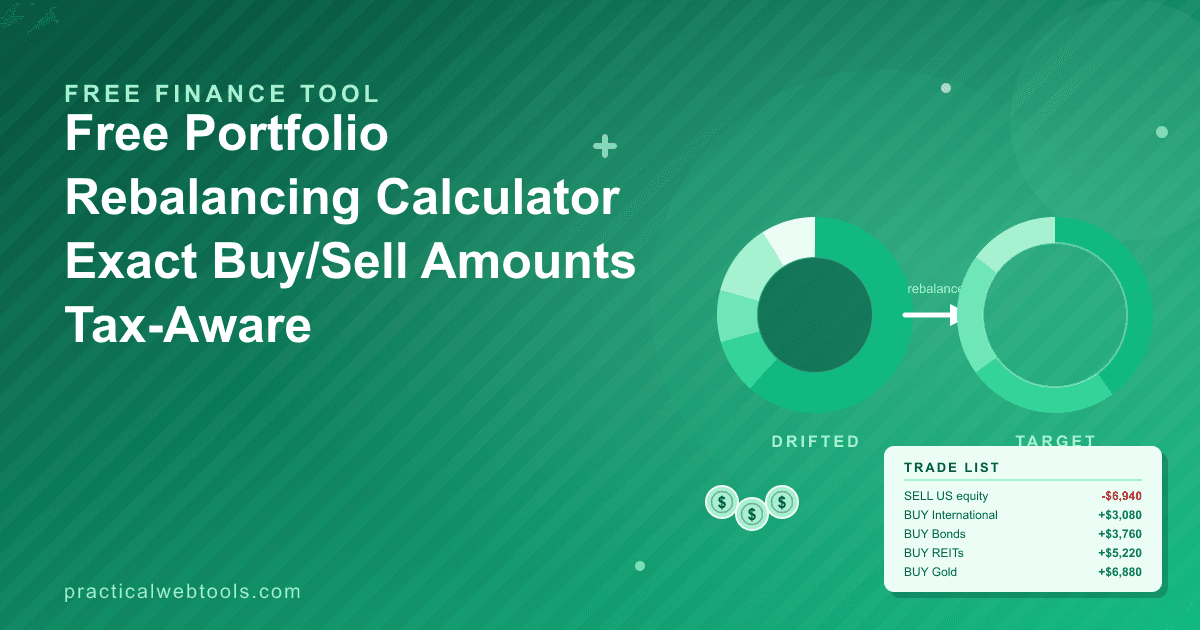
Here is the example I traced through the Portfolio Rebalancing Planner by hand — the same hand-traced check the tool's math was verified against. The portfolio is worth $182,400, targets are 55% US total market, 20% international, 15% bonds, 5% REITs, 5% gold, and $12,000 of the total is idle cash waiting to be deployed. US equities have run up; REITs and gold have lagged.
| Asset | Target | Current value | Actual weight | Target value | Action |
|---|---|---|---|---|---|
| US total market | 55% | $107,260 | 58.8% | $100,320 | Sell $6,940 |
| International | 20% | $33,400 | 18.3% | $36,480 | Buy $3,080 |
| Bonds | 15% | $23,600 | 12.9% | $27,360 | Buy $3,760 |
| REITs | 5% | $3,900 | 2.1% | $9,120 | Buy $5,220 |
| Gold | 5% | $2,240 | 1.2% | $9,120 | Buy $6,880 |
| Idle cash | — | $12,000 | 6.6% | $0 | Deployed in the buys |
(Actual weights are rounded and sum to about 100%.)
Read the bottom line first: the plan needs $18,940 of buys but only $6,940 of sells, because the $12,000 of idle cash covers the difference. That asymmetry is the entire point of buy-preferred rebalancing, and it is what a naive "sell everything over target, buy everything under" approach gets wrong. The planner's output for this portfolio was exactly $18,940 of buys — matching the hand trace.
Notice also what drift looks like in the table. The big allocation is only 3.8 percentage points over target — easy to shrug off — while the small ones are dramatically off: REITs at 2.1% against a 5% target and gold at 1.2% against 5%. Small asset classes drift in relative terms much faster than large ones, which is why rebalancing rules treat them differently (more on that below).
Why Buy-Preferred Ordering Matters
In a taxable account, every sell is a potential tax event. Selling $6,940 of appreciated US equity realizes gains you then owe tax on; buying $18,940 of underweight assets realizes nothing. So the cheapest rebalance is the one that minimizes selling, and there are two standard ways to do that:
- Direct new money first. Dividends, interest, and fresh contributions go to underweight assets before anything is sold. That is the same logic as dollar-cost averaging into the market without timing it — steady buys, no sells, no realized gains. In the worked example, $12,000 of cash absorbed most of the correction; only the US overweight needed a sale.
- Sell only the overshoot, and sell tax-aware. When a sell is unavoidable, the order of operations matters: which lot you sell (oldest long-term versus recent short-term) changes the tax bill. The planner's tax-aware ordering sequences trades so sells happen only when buys alone cannot reach target; the lot-level decision still belongs to you and your broker's records.
Retirement accounts flip the calculus: inside an IRA or similar wrapper, sells generally have no immediate tax consequence, so rebalancing there is close to free. A common pattern for taxable investors is to rebalance aggressively inside tax-advantaged accounts and use new cash to correct drift in taxable ones.
One caution while we are being honest about costs: taxes and fees compound against you from opposite directions. A rebalancing tool stops you from over-trading; the effect of a 1% fee on retirement savings is the other leak worth checking while you are auditing your setup.
The 5/25 Rule: When Not to Rebalance at All
Full-portfolio rebalancing to the dollar is not the only discipline, and it is usually not the best one. Trading has costs — spreads, settlement, taxable gains — so practitioners rebalance on triggers rather than on the calendar. The classic trigger rule is 5/25, credited to Larry Swedroe:
- 5 — rebalance an asset when it drifts 5 percentage points from target.
- 25 — or when it drifts 25% of the target weight in relative terms, whichever is smaller.
The "whichever is smaller" clause is what makes the rule work for small allocations. A 60% equity target trips at 5 points (band 55–65%), because 25% of 60 is 15 points and 5 is smaller. A 5% REIT slice trips at 1.25 points (25% of 5), because 1.25 is smaller than 5 — its band is roughly 3.75–6.25%. Large allocations get wide bands; small ones get tight ones. In the worked example above, REITs at 2.1% versus a 5% target are far outside their 5/25 band, so they trigger; US equity at 58.8% versus 55% sits inside its band and would not.
You can use the planner either way: compute the full trade list and execute only the out-of-band positions, or rebalance fully once or twice a year. The drift table gives you the numbers; the rule gives you the discipline.
Getting Your Holdings Into the Planner
The import step is a CSV, and every broker exports one. The practical workflow:
- Export positions from your broker. Look for "positions", "holdings", or "portfolio export" in the account menu; nearly all brokers offer CSV.
- Map the columns. The planner needs, per holding, what the asset is and what it is worth. If your export has one row per lot or per account, aggregate to one row per asset class first — a spreadsheet pivot takes thirty seconds.
- Choose asset-class granularity. Group funds by role (US equity, international, bonds, real assets, cash) rather than by ticker, so the targets you type match the allocation you actually decided on.
- Set target weights and import. The planner computes drift per asset and the buy/sell list; review, then act on it in your brokerage.
Treat the output as instructions for you, not instructions to the market. Prices move between export and execution, so a $6,940 sell is a $6,900-ish sell by the time you place it — close enough, because the last fraction of a percent of drift has no risk meaning. Re-export whenever you want a fresh snapshot; the numbers are only as current as the CSV you fed in.
What the Planner Doesn't Do
Honest boundaries, so you know what you are holding:
- It does not execute trades. It computes the list; you place the orders at your broker. That also means it cannot rebalance for you while you sleep.
- It is not tax software. Tax-aware ordering helps you sequence trades sensibly, but lot selection, wash sales, and your actual bracket are between you, your broker, and your tax preparer.
- It has no live feed. It works from the holdings CSV you import, so its snapshot ages as the market moves. For a personal portfolio, exporting on rebalancing day (or monthly) is entirely sufficient.
None of these are defects for the intended job: a deliberate, occasional, numbers-exact decision aid that costs nothing and sends your holdings nowhere. Your positions load from a CSV on your machine — no upload, no sign-up, nothing you import leaves your device.
Frequently Asked Questions
How often should I rebalance a portfolio?
For most personal portfolios, checking drift quarterly and acting once or twice a year is plenty. If you prefer rule-based discipline, use the 5/25 bands: check monthly, trade only when an asset breaches its band. Adding money regularly? Direct new contributions to underweight assets first — that often handles small drifts without any selling.
What is the 5/25 rebalancing rule exactly?
Rebalance when an asset drifts from target by 5 absolute percentage points, or by 25% of its target weight in relative terms — whichever trigger is smaller. Large allocations get 5-point bands (60% target: 55–65%); small ones get relative bands (5% target: roughly 3.75–6.25%). It keeps small sleeves from being ignored and big ones from being over-traded.
Is this really free, and how does it compare with getquin?
The planner is free and runs entirely in your browser from a CSV you import. getquin's Premium tier runs €89.99 per year at the time of writing, and most portfolio trackers of its class show drift charts while reserving the actionable trade list for paid tiers. The trade list is the part this tool treats as the default, not the upgrade.
Does the planner place the trades for me?
No. It computes exact buy and sell amounts per asset, in buy-preferred, tax-aware order; placing orders stays with you and your broker. That is deliberate — a static calculator with no account, no credentials, and no brokerage connection cannot act on your portfolio, which is also why your holdings never leave your machine.
Should I rebalance in my taxable or retirement account first?
Retirement accounts first, generally, because sells inside them usually have no immediate tax cost. In taxable accounts, correct drift with new contributions and dividends where possible, and sell only what buys cannot fix — which is exactly the ordering the planner applies when it computes the trade list.