Ratio Calculator: Your Ultimate Guide to Simplifying Ratios

Your Guide to Simplifying Ratios with a Ratio Calculator
Ever found yourself staring at a recipe that calls for a 3:2:1 ratio of ingredients, but you need to make a much larger batch? Or perhaps you're a designer trying to scale an image while maintaining its 16:9 aspect ratio. Ratios are everywhere, from the kitchen to our computer screens, acting as the silent language of proportion and comparison. Yet, when faced with complex numbers like 1920:1080 or 768:1024, they can seem more confusing than helpful.
This is where the power of simplification comes in. Boiling a ratio down to its simplest form transforms it from a cumbersome set of numbers into an easily understandable relationship. And while the math behind it is straightforward, the process can be tedious and prone to error. That's why a ratio calculator is an indispensable tool in any modern toolkit.
In this comprehensive guide, we'll demystify ratios completely. We'll explore what they are, why simplifying them is so important, and provide a step-by-step tutorial on how to do it manually. Most importantly, we'll show you how an online ratio calculator can save you time and effort, allowing you to focus on the task at hand, whether it's baking the perfect cake, designing a flawless website, or even understanding the efficiency of your digital files.
What Exactly is a Ratio? The Fundamentals
A ratio is a mathematical expression that shows the relationship between two or more quantities. It tells us how much of one thing there is compared to another. Think of it as a recipe for numbers. For every 'A' parts of one thing, there are 'B' parts of another.
There are three common ways to write a ratio:
- Using a colon:
a:b(e.g.,2:3) - Using the word "to":
a to b(e.g.,2 to 3) - As a fraction:
a/b(e.g.,2/3)
All three formats represent the same relationship. The colon format is the most widely used when discussing ratios in a general sense.
Real-World Examples of Ratios
- Cooking: A recipe for vinaigrette might call for a 3:1 ratio of oil to vinegar.
- Screen Dimensions: A widescreen TV has an aspect ratio of 16:9, meaning for every 16 units of width, there are 9 units of height.
- Map Scales: A map scale of 1:100,000 means that 1 unit of distance on the map represents 100,000 units in the real world.
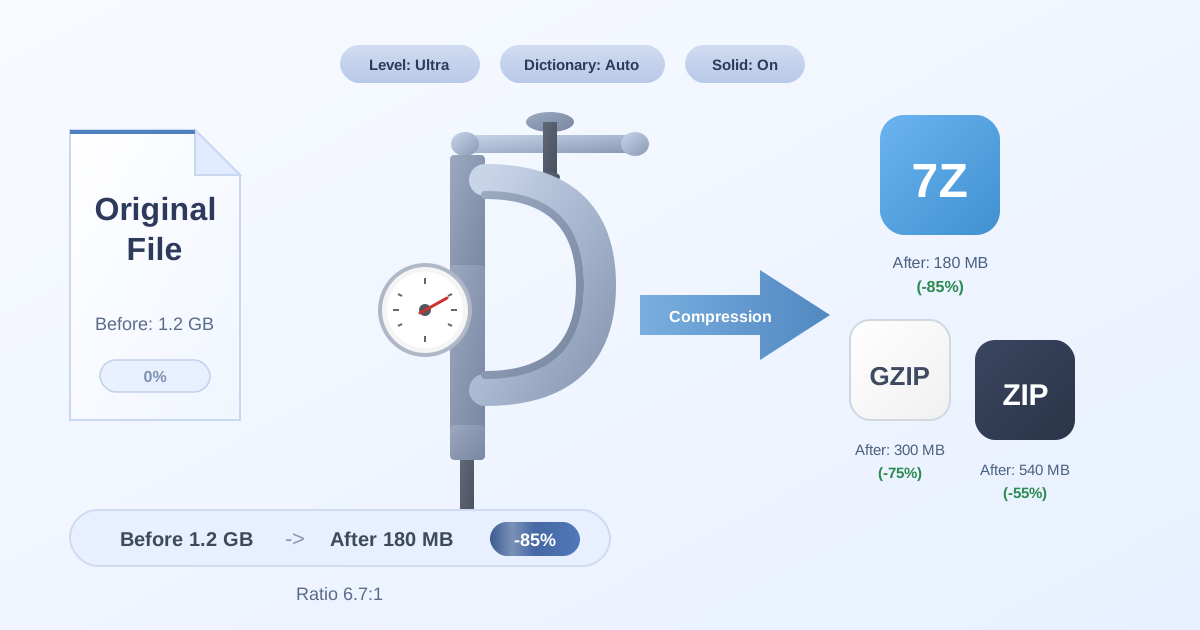
- File Compression: The efficiency of a file compressor is often described as a compression ratio, comparing the original file size to the compressed file size (e.g., 5:1).
Why You Absolutely Need to Simplify Ratios
Working with a ratio like 216:324 is not practical. It's difficult to visualize and even harder to scale. Simplifying this ratio to its most basic form, 2:3, makes it instantly clear. Here’s why this process is so crucial.
- Clarity and Insight: A simplified ratio is intuitive. Knowing your screen is 16:9 is far more useful than knowing it's 1920:1080. It provides an immediate understanding of its shape.
- Easy Comparison: Suppose you have two mixtures. One is 10:25 and the other is 12:30. Which is stronger? It's hard to tell. But if you simplify them, you find they are both 2:5. They are identical.
- Accurate Scaling: If you need to scale a project, a simplified ratio is your best friend. To double a recipe with a 2:3 ratio, you simply use 4:6. This is essential for architects, engineers, graphic designers, and chefs.
- Efficiency Measurement: In technical fields, simplified ratios are key for performance metrics. For example, understanding the compression ratio helps you evaluate how effectively you can reduce file sizes, which is vital for saving storage space and speeding up data transfers.
How to Simplify Ratios Manually: A Step-by-Step Guide
Before you reach for a calculator, it's helpful to understand the manual process. It all comes down to one key concept: the Greatest Common Divisor (GCD).
Step 1: Find the Greatest Common Divisor (GCD)
The GCD (also known as the Greatest Common Factor or GCF) is the largest positive integer that divides each of the numbers in the ratio without leaving a remainder.
Let's take the ratio 36:48.
To find the GCD, you can list the factors of each number:
- Factors of 36: 1, 2, 3, 4, 6, 9, 12, 18, 36
- Factors of 48: 1, 2, 3, 4, 6, 8, 12, 16, 24, 48
The largest number that appears in both lists is 12. Therefore, the GCD of 36 and 48 is 12.
Step 2: Divide Both Parts of the Ratio by the GCD
Once you have the GCD, the final step is simple. Just divide each number in the ratio by the GCD.
- 36 ÷ 12 = 3
- 48 ÷ 12 = 4
So, the simplified form of the ratio 36:48 is 3:4.
This two-step process works for any ratio, no matter how large the numbers are. The main challenge is finding the GCD, which can be time-consuming for bigger numbers.
The Effortless Solution: Using an Online Ratio Calculator
Understanding the manual method is great, but in practice, an online ratio calculator is the superior choice. It automates the entire process, giving you instant and accurate results.
Here’s why a calculator is so powerful:
- Speed: It performs the GCD calculation and division in a fraction of a second.
- Accuracy: It eliminates the risk of human error, ensuring your simplified ratio is always correct.
- Handles Complexity: A good calculator can handle ratios with three or more parts (e.g., 10:20:30), decimals (e.g., 2.5:5), and extremely large numbers with ease.
Using a tool like this streamlines your workflow, whether you're adjusting a creative project, checking financial data, or analyzing technical specifications.
Advanced Applications: Ratios in the Digital World
Ratios are a fundamental building block of our digital lives, especially in file management and media. Understanding them can help you make more informed decisions.
Aspect Ratios in Images and Video
Aspect ratio describes the proportional relationship between the width and height of an image or screen. It's written as width:height.
- 4:3: The standard for older televisions and computer monitors.
- 16:9: The standard for modern widescreen TVs, monitors, and online video (e.g., a 1920x1080 resolution simplifies to 16:9).
- 21:9: An ultrawide format popular in cinemas and for immersive gaming.
When you resize an image, maintaining the aspect ratio is critical to avoid stretching or squashing it. A ratio calculator helps you determine the correct dimensions for scaling.
Compression Ratios and File Management
One of the most practical, yet often overlooked, applications of ratios is in file compression. A compression ratio compares the original file size to the compressed file size.
A ratio of 10:1 means the original file was 10 times larger than its compressed version. This is a highly efficient compression.
Understanding this concept is essential when you want to save disk space or send large files. When you use a tool to Compress Files, you are essentially trying to achieve the best possible compression ratio without sacrificing quality. Different file types and compression algorithms yield different ratios. For example, a text file will compress much more efficiently than a JPEG image.
After compressing, you'll need a way to access the data again. That's when you Decompress Files, a process that restores the file to its original size and state, effectively reversing the ratio.
The choice of compression format also matters greatly. Formats like ZIP are common, but others like 7Z often offer superior compression ratios. If you're looking to maximize space savings, converting between formats can be a smart move. For instance, using a ZIP to 7Z converter can often result in a smaller file, thus improving your compression ratio.
Common Mistakes to Avoid When Working with Ratios
While simple in concept, ratios have a few common pitfalls that can trip you up.
- Ignoring the Order: The ratio
a:bis not the same asb:a. The order of the numbers carries specific meaning. A 1:3 mix of cement to sand is very different from a 3:1 mix. - Using Inconsistent Units: When comparing quantities, ensure they are in the same unit. To find the ratio of 1 minute to 300 seconds, you must first convert them both to seconds (60:300) before simplifying (1:5).
- Partial Simplification: Don't stop until the numbers in the ratio have no common factors other than 1. For example, simplifying 36:48 to 18:24 is not enough; it must be reduced all the way to 3:4.
Using a reliable ratio calculator helps you avoid these mistakes automatically, ensuring your results are always correct.
Conclusion: Simplify Your World with Ratios
Ratios are more than just numbers on a page; they are a powerful tool for bringing balance, proportion, and clarity to a wide range of tasks. From the creative arts to technical analysis, understanding and simplifying ratios is a fundamental skill. By breaking down complex relationships into their simplest forms, we can make better decisions, scale our work accurately, and communicate ideas more effectively.
While learning the manual method is valuable, embracing modern tools like an online ratio calculator empowers you to work faster and more accurately. It frees you from tedious calculations and lets you focus on what truly matters: your project.
Now that you've mastered the art of simplifying ratios, why not explore the other powerful, free, and privacy-focused utilities at Practical Web Tools? Discover our full suite of tools designed to make your digital life easier.