Time Calculator Guide: Add & Subtract Hours and Minutes Fast

Your Ultimate Guide to Calculating Time in Hours and Minutes
Ever stared at a timesheet and felt your brain start to short-circuit? You're not alone. Calculating time isn't as straightforward as standard math. Adding 8 hours and 45 minutes to a 9:15 AM start time involves more than just plugging numbers into a regular calculator. This complexity can lead to errors in payroll, inaccurate project billing, and missed deadlines. The truth is, mastering time calculation is a crucial skill in both our professional and personal lives, but most of us were never taught a simple, reliable way to do it.
That's where a time calculator comes in. These specialized tools are designed to handle the unique logic of time arithmetic—carrying over minutes to hours and borrowing when needed—with flawless accuracy. In this comprehensive guide, we'll demystify the process of time calculation. We'll walk you through the manual methods step-by-step, explore the powerful advantages of using an online time calculator, and provide practical examples for common scenarios like calculating work hours and managing project timelines. By the end, you'll be able to add and subtract time with confidence and efficiency.
What Exactly is a Time Calculator?
A time calculator is a tool specifically designed to perform arithmetic operations on units of time: hours, minutes, and seconds. Unlike a standard calculator that operates on a decimal system (base-10), a time calculator understands the sexagesimal system (base-60) used for time. This means it knows that 60 seconds make a minute, and 60 minutes make an hour.
This fundamental difference is key. If you try to add 1.50 (one hour, fifty minutes) and 0.20 (twenty minutes) on a standard calculator, you'll get 1.70. A time calculator, however, knows that 50 minutes plus 20 minutes equals 70 minutes, which is 1 hour and 10 minutes. It correctly adds this to the initial hour, giving you the correct answer: 2 hours and 10 minutes.
Online time calculators offer a simple interface where you can input start times, end times, or durations and let the software handle the complex conversions instantly. They eliminate human error and save you valuable mental energy that can be better spent on more important tasks.
Why You Need a Time Calculator: Key Use Cases
The applications for a time calculator are vast and varied. It's a tool that provides clarity and accuracy in dozens of daily situations. Here are some of the most common use cases:
- Employee Payroll: Accurately calculate total work hours for an employee's pay period. This includes factoring in start times, end times, and unpaid lunch breaks to ensure fair and precise compensation.
- Project Management & Freelance Billing: Track the exact amount of time spent on various tasks and projects. This is essential for billing clients accurately, estimating future project timelines, and analyzing team productivity.
- Event Planning: Create detailed schedules and timelines for events. A time calculator helps you determine the duration of each segment and ensure everything runs smoothly from start to finish.
- Personal Productivity: Use techniques like the Pomodoro method by tracking blocks of focused work and breaks. Calculating your total productive time each day helps you understand your work patterns and improve focus.
- Travel Planning: Calculate total travel time, including flight durations, layovers, and travel to and from airports. It's also useful for understanding and converting between different time zones.
- Logistics and Shipping: Estimate delivery times and plan routes by adding up driving times, scheduled stops, and potential delays.
- Hobbies and Creative Pursuits: Whether you're calculating total cooking and resting time for a recipe, timing darkroom photo development, or tracking workout durations, a time calculator brings precision to your passions.
The Manual Method: How to Calculate Time by Hand
Before you rely solely on a digital tool, it's helpful to understand the principles behind time calculation. Knowing how to do it manually can be useful in a pinch and gives you a greater appreciation for the convenience of an online calculator. Let's break down the process for addition and subtraction.
How to Add Time
Adding time involves handling the minutes first and then carrying over any full hours to the hours column.
Example: Calculate the total time for a project that took 4 hours 35 minutes on day one and 3 hours 50 minutes on day two.
-
Add the Minutes: Start by adding the minutes together.
35 minutes + 50 minutes = 85 minutes -
Convert Excess Minutes to Hours: Since there are 60 minutes in an hour, we check how many hours are in our total minutes. 85 minutes is more than 60, so we convert it.
85 minutes = 60 minutes + 25 minutes = 1 hour and 25 minutes -
Add the Hours: Now, add the original hours and include the hour you carried over from the minutes.
4 hours + 3 hours + 1 hour (carried over) = 8 hours -
Combine the Results: Combine your final hour and minute totals. Answer: 8 hours and 25 minutes.
How to Subtract Time
Subtracting time can be trickier, especially when you need to "borrow" from the hour column.
Example: You started work at 9:05 AM and left at 5:25 PM. You took a 45-minute unpaid break. How many hours did you work?
First, let's calculate the total time elapsed between start and end.
-
Set Up the Subtraction: Place the later time on top.
5:25 PM- 9:05 AMTo make this easier, let's use a 24-hour clock: 5:25 PM is 17:25.17 hours 25 minutes- 9 hours 05 minutes -
Subtract the Minutes:
25 minutes - 5 minutes = 20 minutes -
Subtract the Hours:
17 hours - 9 hours = 8 hours
So, the total time elapsed is 8 hours and 20 minutes. Now, we subtract the 45-minute break. Here's where we need to borrow.
-
Set Up the Second Subtraction:
8 hours 20 minutes- 0 hours 45 minutes -
Borrow from the Hour Column: You can't subtract 45 from 20. So, you "borrow" 1 hour (60 minutes) from the 8 hours. This changes
8 hours 20 minutesinto7 hours and (60 + 20) minutes, or7 hours and 80 minutes. -
Subtract the Minutes: Now the subtraction is easy.
80 minutes - 45 minutes = 35 minutes -
Subtract the Hours:
7 hours - 0 hours = 7 hours -
Combine the Results: Answer: You worked for 7 hours and 35 minutes.
As you can see, the manual process works, but it's slow and has multiple steps where a simple mistake can throw off the entire calculation.
Advanced Time Management: Working with Timesheets and Project Files
Accurate time calculation is the bedrock of effective project and business management. Once you've calculated your hours, the next step is often to log, share, and archive that data along with your project deliverables. This is where time management intersects with file management.
Managing Time Logs and Reports
Most time-tracking software allows you to export detailed reports, often as CSV, Excel, or PDF files. These logs are crucial for invoicing, payroll, and performance analysis. For a large team or a long project, these export files can become surprisingly large and cumbersome to share via email.
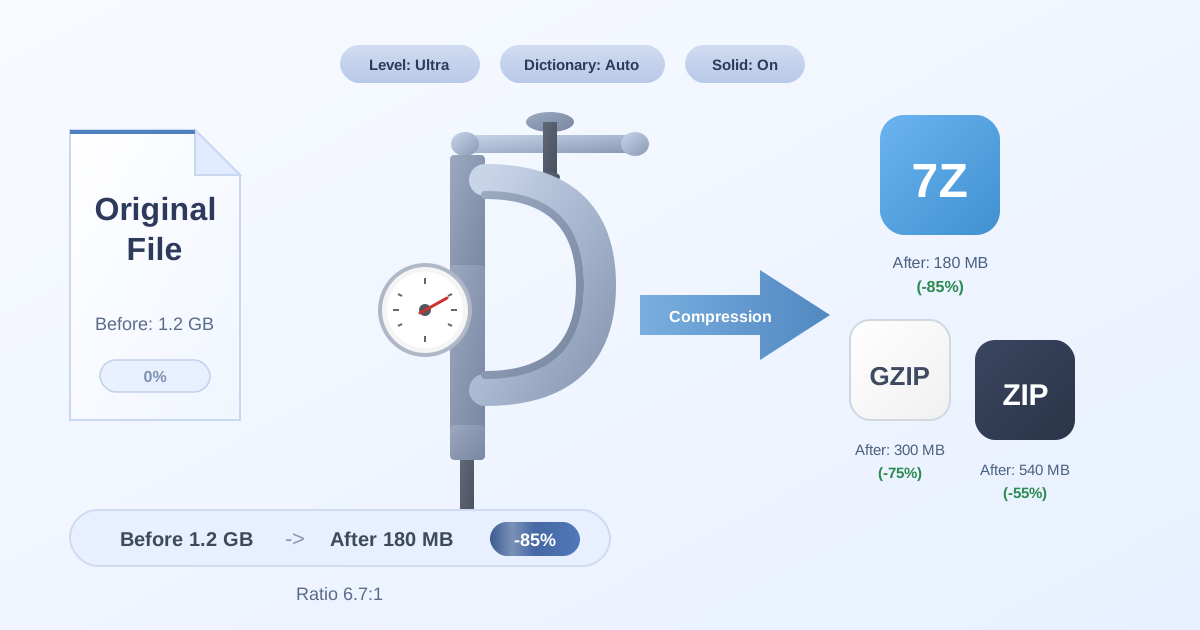
To streamline this process, it's a best practice to archive them. Before sending your monthly timesheet report to accounting, you can Compress Files into a single, smaller ZIP folder. This not only reduces the file size for easier transfer but also keeps related documents neatly organized.
Archiving and Delivering Project Assets
At the conclusion of a project, you typically need to deliver a package of final files to your client. This could include design assets, source code, final documents, and more. These collections of files are almost always sent as a compressed archive.
Different clients or collaborators may have specific requirements for file formats. For instance, some prefer the 7Z format for its superior compression ratio compared to ZIP. If your deliverables are zipped, you don't need to re-compress everything from scratch. You can simply use a free online tool to convert your ZIP to 7Z in seconds, ensuring your delivery meets the client's specifications. Being able to quickly adapt to these technical requirements makes you look professional and efficient.
If you receive a project archive from a colleague in a format you're not used to, online tools are again your best friend. A good file utility toolkit should let you easily Decompress Files of any common type, allowing you to access the contents without needing to install special software.
Example Payroll Calculation Table
Here’s how an online time calculator can quickly generate the data needed for a weekly timesheet. The tool calculates the daily total after subtracting the break, making the final sum trivial.
| Day | Start Time | End Time | Break (mins) | Daily Total (Hours) |
|---|---|---|---|---|
| Monday | 09:00 AM | 05:30 PM | 30 | 8.00 |
| Tuesday | 08:45 AM | 05:15 PM | 30 | 8.00 |
| Wednesday | 09:15 AM | 05:45 PM | 30 | 8.00 |
| Thursday | 09:00 AM | 05:00 PM | 60 | 7.00 |
| Friday | 08:30 AM | 04:30 PM | 30 | 7.50 |
| Total | 38.50 |
Common Pitfalls in Time Calculation (And How to Avoid Them)
Despite its importance, time calculation is rife with potential errors. Here are a few common mistakes to watch out for:
- AM/PM Confusion: This is the most frequent error. Always double-check whether a time is in the morning or afternoon, especially when calculating durations that cross the 12:00 mark. Using a 24-hour format (military time) is a foolproof way to avoid this.
- Forgetting Breaks: Failing to subtract unpaid breaks is a common payroll error that leads to overpayment. Always confirm if breaks are included or excluded from the total work time.
- Decimal Misinterpretation: Mistaking decimal hours for minutes. For example, 7.5 hours is 7 hours and 30 minutes, not 7 hours and 50 minutes. An online time calculator always handles this conversion correctly.
- Ignoring Time Zones: In a world with remote teams, time zones are critical. When scheduling meetings or calculating deadlines across regions, ensure you have a clear reference point, such as UTC, to coordinate everyone effectively.
Using a dedicated time calculator tool helps you sidestep all of these pitfalls automatically, ensuring your results are accurate every single time.
Conclusion: Master Your Time with the Right Tools
Calculating time doesn't have to be a daunting task. While understanding the manual process is valuable, leveraging modern digital tools is the key to achieving speed, accuracy, and efficiency. A reliable time calculator saves you from frustrating mental gymnastics and costly errors, whether you're managing a complex project, processing payroll, or simply planning your day.
By integrating these tools into your workflow, you free up cognitive resources to focus on what truly matters: getting the work done. As you streamline your time management, remember that efficiency extends to all areas of your digital life. Your time logs, project files, and final deliverables all need to be managed effectively.
For a suite of powerful, free, and privacy-focused utilities that can handle all your digital tasks, explore the tools available here at Practical Web Tools. From file conversion to compression, we have you covered.